Project commands, tasks & tests
Every project type can carry a set of lifecycle commands (compile, test, run, and so on) and named tasks, and Projectile can run the test at point. This page covers all of that.
Configure a project’s lifecycle commands and other attributes
There are a few variables that are intended to be customized via .dir-locals.el.
-
for configuration -
projectile-project-configure-cmd -
for compilation -
projectile-project-compilation-cmd -
for testing -
projectile-project-test-cmd -
for installation -
projectile-project-install-cmd -
for packaging -
projectile-project-package-cmd -
for running -
projectile-project-run-cmd -
for configuring the test prefix -
projectile-project-test-prefix -
for configuring the test suffix -
projectile-project-test-suffix -
for configuring the related-files-fn property -
projectile-project-related-files-fn -
for configuring the src-dir property -
projectile-project-src-dir -
for configuring the test-dir property -
projectile-project-test-dir
When these variables have their default value of nil, Projectile
runs the default command for the current project type. You can
override this behavior by setting them to either a string to run an
external command or an Emacs Lisp function:
(setq projectile-project-test-cmd #'custom-test-function)In addition caching of commands can be disabled by setting the variable
projectile-project-enable-cmd-caching to nil. This is useful for
preset-based CMake projects.
Because the cached command takes precedence over the value from
.dir-locals.el (and the project type default), editing those won’t take
effect until the cache is refreshed. Run projectile-discard-command-cache
to drop the cached commands for the current project so they’re re-read on the
next run. You can also wire it into an after-save-hook for .dir-locals.el
buffers if you edit them often.
A project type can also register a command as a function rather than a
string - CMake’s preset pickers do this. Such a command is resolved afresh on
every run, so the picker gets to prompt each time instead of being frozen after
the first run. Editing what it offers you at the prompt overrides it: the
edited command is remembered like any other, and projectile-discard-command-cache
hands the project back to the function.
By default, Projectile will not add consecutive duplicate commands to its
command history. To alter this behaviour you can use projectile-cmd-hist-ignoredups.
The default value of t means consecutive duplicates are ignored, a value
of nil means nothing is ignored, and a value of 'erase' means only
the last duplicate is kept in the command history.
Each command type (configure, compile, test, install, package, run) keeps its
own command history, so when you press M-p at, say, the test prompt you
only cycle through previous test commands instead of a mix of every command
you’ve run in the project. projectile-repeat-last-command still re-runs the
most recent command of any type.
Project tasks
Besides the standard lifecycle commands (compile, test, run, etc.), Projectile
supports an arbitrary number of named tasks per project via
projectile-tasks, an alist mapping task names to commands. Tasks are run
with projectile-run-task (s-p c x), which prompts for a task with
completion and executes its command exactly like the lifecycle commands (in
projectile-compilation-dir, with %p expanded to the project name). Each
task gets its own compilation buffer, named *projectile-task: NAME* (with
the project name appended when projectile-per-project-compilation-buffer is
non-nil), so several tasks can run side by side.
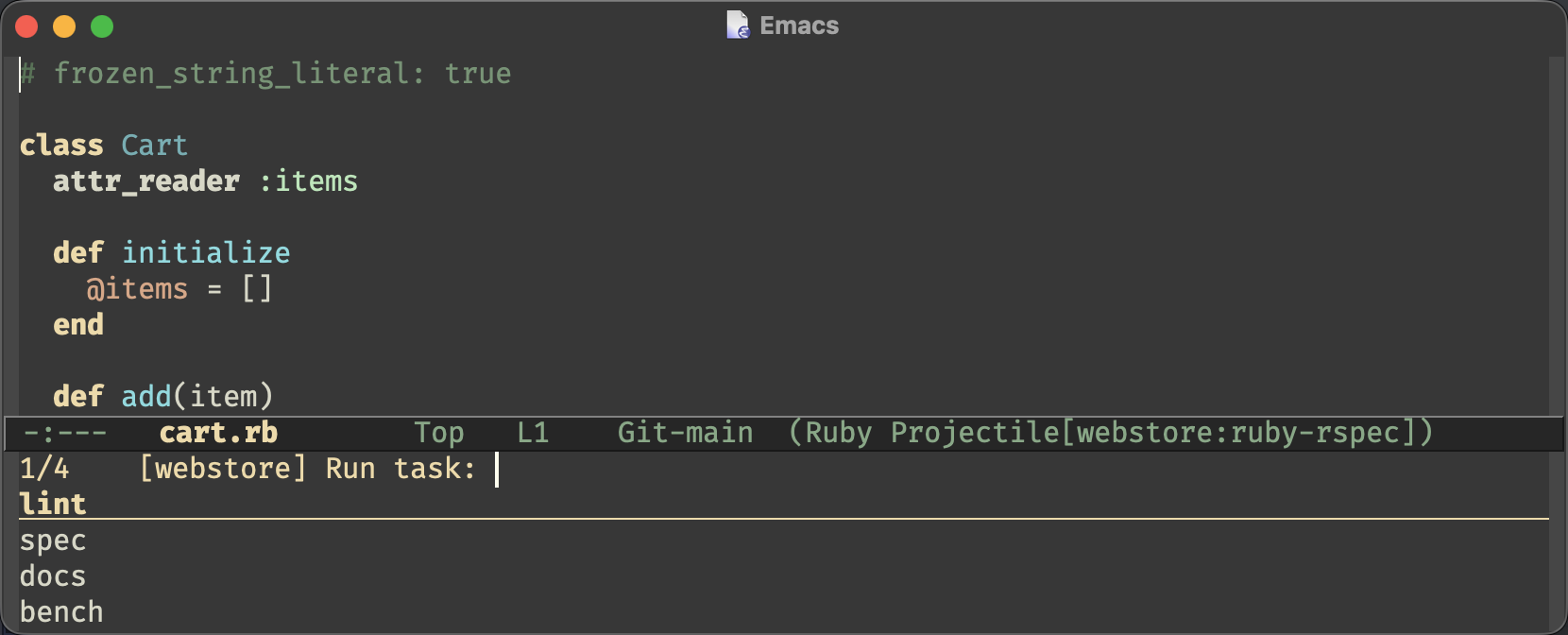
A task’s command is either a shell command string or a function called with no
arguments (with default-directory at the project root) that returns one.
Tasks can be defined in three places:
-
globally, by customizing
projectile-tasks -
per project type, via the
:taskskeyword ofprojectile-register-project-typeandprojectile-update-project-type -
per project, by setting
projectile-tasksin.dir-locals.el, which makes the tasks shareable with your team through your VCS
On top of those, Projectile discovers the tasks your project’s own tooling already defines - see Discovered tasks below.
The effective tasks for a project are the project type’s tasks merged with
projectile-tasks and the discovered ones; when several define a task with the
same name, the projectile-tasks entry wins, then the project type’s. Use
projectile-project-tasks if you need the merged alist programmatically.
Here’s a .dir-locals.el example:
((nil . ((projectile-tasks . (("lint" . "make lint")
                              ("docs" . "make docs")
("release" . "make release VERSION=%p"))))))| Only tasks whose commands are strings are treated as safe directory-local values; tasks with function commands have to be defined globally or via a project type. |
And a project-type example:
(projectile-update-project-type
 'npm
 :tasks '(("lint" . "npm run lint")
          ("outdated" . "npm outdated")))
Like the other lifecycle commands, projectile-run-task offers the command
for confirmation before running it (controlled by the standard
compilation-read-command). Since tasks defined in a project’s committed
.dir-locals.el are accepted without the usual risky-local-variable prompt,
that confirmation is also what stands between you and a task defined by a
repository you’ve just checked out - the same trade-off Emacs’s
compile-command makes.
Invoking projectile-run-task with a prefix argument (C-u s-p c x) lets
you edit the task’s command before it’s run, which is handy for passing ad-hoc
arguments. Each task keeps its own command history at that prompt.
projectile-repeat-last-task (s-p c X) re-runs the last task executed
in the current project, including any ad-hoc edits you made to its command,
without asking again (you confirmed it the first time). It survives Emacs
restarts when savehist-mode is enabled.
Discovered tasks
Most projects already list their tasks somewhere - npm scripts, Makefile
targets, justfile recipes - and retyping those into projectile-tasks is
busy-work. Projectile reads them straight out of the project instead, so
projectile-run-task is useful in a fresh checkout without any configuration.
Out of the box it knows about:
| Source | File | Tasks named |
|---|---|---|
npm scripts |
|
|
Deno tasks |
|
|
Composer scripts |
|
|
just recipes |
|
|
go-task tasks |
|
|
Make targets |
|
|
Discovered tasks carry the name of the tool that defines them, so they never collide with the tasks you configure yourself, and you can tell at the prompt where a task came from. Only plain named Make targets are offered - pattern rules, file targets and the dot-targets aren’t things you’d run by hand.
Set projectile-discover-tasks to nil to turn this off, or customize
projectile-task-providers to add your own. A provider is a function taking
the project root and returning an alist of (TASK-NAME . COMMAND); one that
signals an error is skipped, so a malformed manifest can’t break the command.
The manifests are read on each invocation rather than cached, and providers never shell out, so nothing has to be re-indexed when you add a script.
Monorepos and subprojects
A monorepo is a single project as far as version control is concerned, and that’s how Projectile treats it too - the repository is the project, and finding files or searching covers all of it. But its parts usually have manifests of their own (a crate, a package, a Maven module), and building or testing the whole repository when you’re working on one of them is wasteful.
Projectile calls those parts subprojects: any directory below the project
root that holds a project manifest. What counts as a manifest comes from
projectile-subproject-markers, which by default is derived from the
registered project types, so every type Projectile knows about - including the
ones you register yourself - is recognized inside a monorepo. A polyglot
repository works out of the box: a Cargo.toml under a package.json project
is still a subproject.
projectile-project-subprojects returns them, scanning the project’s own file
listing (so the ignore rules apply, and a vendored
dependency’s manifest doesn’t count as a subproject).
-
projectile-find-file-in-subproject(s-p c m f) prompts for a subproject and then completes over just its files. -
Every lifecycle command has a subproject variant, bound one level down from the project-wide one:
projectile-configure-subproject(s-p c m o),-compile-(s-p c m c),-test-(s-p c m t),-install-(s-p c m i),-package-(s-p c m p) and-run-(s-p c m r). They run in the nearest subproject - the one containing the file you’re visiting - rather than at the project root. The command itself is the project’s, only the directory changes, which is what workspace-aware tools like Cargo, npm and Maven need to scope their work.
The prompt tells you where the command will run (Test command in
services/api/:), so a subproject build is never mistaken for a whole-project
one. A project type that builds in a subdirectory keeps doing so, relative to
the subproject: in a Meson monorepo s-p c m c runs ninja in
sub/build/, not in sub/.
If there’s no manifest between the current file and the project root, those commands say so rather than silently building the whole repository.
Running the test at point
While projectile-test-project runs a project’s whole test suite,
projectile-run-test-at-point (s-p c .) runs just the test your
cursor is on. It uses the buffer’s tree-sitter parse tree to find the
test enclosing point, so it requires Emacs 29+ built with tree-sitter
support and a tree-sitter major mode (e.g. python-ts-mode).
Out of the box the following languages are supported:
| Major mode | Test | Command |
|---|---|---|
|
|
|
|
|
|
|
|
|
The command runs from the same directory as projectile-test-project
(normally the project root), with the same buffer-saving behavior, but
it doesn’t overwrite the project’s remembered test command or command
history. With a prefix argument you can edit the command before it’s
run, e.g. to add extra flags.
Support for more languages can be added via
projectile-test-at-point-rules, an alist keyed by major mode (matched
with derived-mode-p). Each rule lists the tree-sitter node types that
can represent a test (:node-types), a function extracting the test
name from such a node, or returning nil to keep looking further up
the tree (:name-fn), and a function building the shell command from
the test name and the file name (:command-fn). For example, a rule
for Rust’s #[test] functions:
(add-to-list 'projectile-test-at-point-rules
             '(rust-ts-mode
               :node-types ("function_item")
               :name-fn (lambda (node)
                          ;; Any function will do; cargo test matches by name.
                          (treesit-node-text
                           (treesit-node-child-by-field-name node "name") t))
               :command-fn (lambda (test-name _file-name)
                             (format "cargo test %s -- --exact"
                                     (shell-quote-argument test-name)))))
The test name and file name a :command-fn receives come from
the buffer’s source and the repository, so pass them through
shell-quote-argument (as the built-in rules and the example above do)
rather than interpolating them into the command as-is. Otherwise a
crafted test name or file name in a checked-out project could inject
shell code.
|