Working across repositories
Not all work fits in one directory. There are two shapes of "somewhere else" that come up constantly, and Projectile has a command for each:
-
The same project, checked out twice - you’re on a feature branch here and want the copy that still has
mainin it.projectile-switch-worktree(s-p W). -
Different projects that belong together - a library and the app using it, a tool and its documentation site.
projectile-switch-sibling-project(s-p n p).
Both are narrowed versions of projectile-switch-project (s-p p).
That command offers every project you’ve ever visited; these two offer
the handful you’re likely to actually want, which is the difference
between typing a few characters and remembering which of a hundred
directories is the right one.
| Keybinding | Command |
|---|---|
s-p W |
|
s-p n p |
|
s-p n f |
|
s-p n s |
|
s-p n b |
|
s-p n o |
|
s-p n t |
|
s-p n is the prefix for everything that works across related projects, and each key under it is the project-wide one a level down - s-p f finds a file here, s-p n f finds one anywhere in the family.
The two switch commands honour projectile-switch-project-action, and both
take a prefix argument to run projectile-dispatch instead, exactly like the
other switch commands.
The other two don’t switch anywhere - see Working across a group below.
Other checkouts of this project
s-p W lists the other directories holding the same repository, each annotated with whatever tells it apart - the branch for git, the workspace name for Jujutsu:
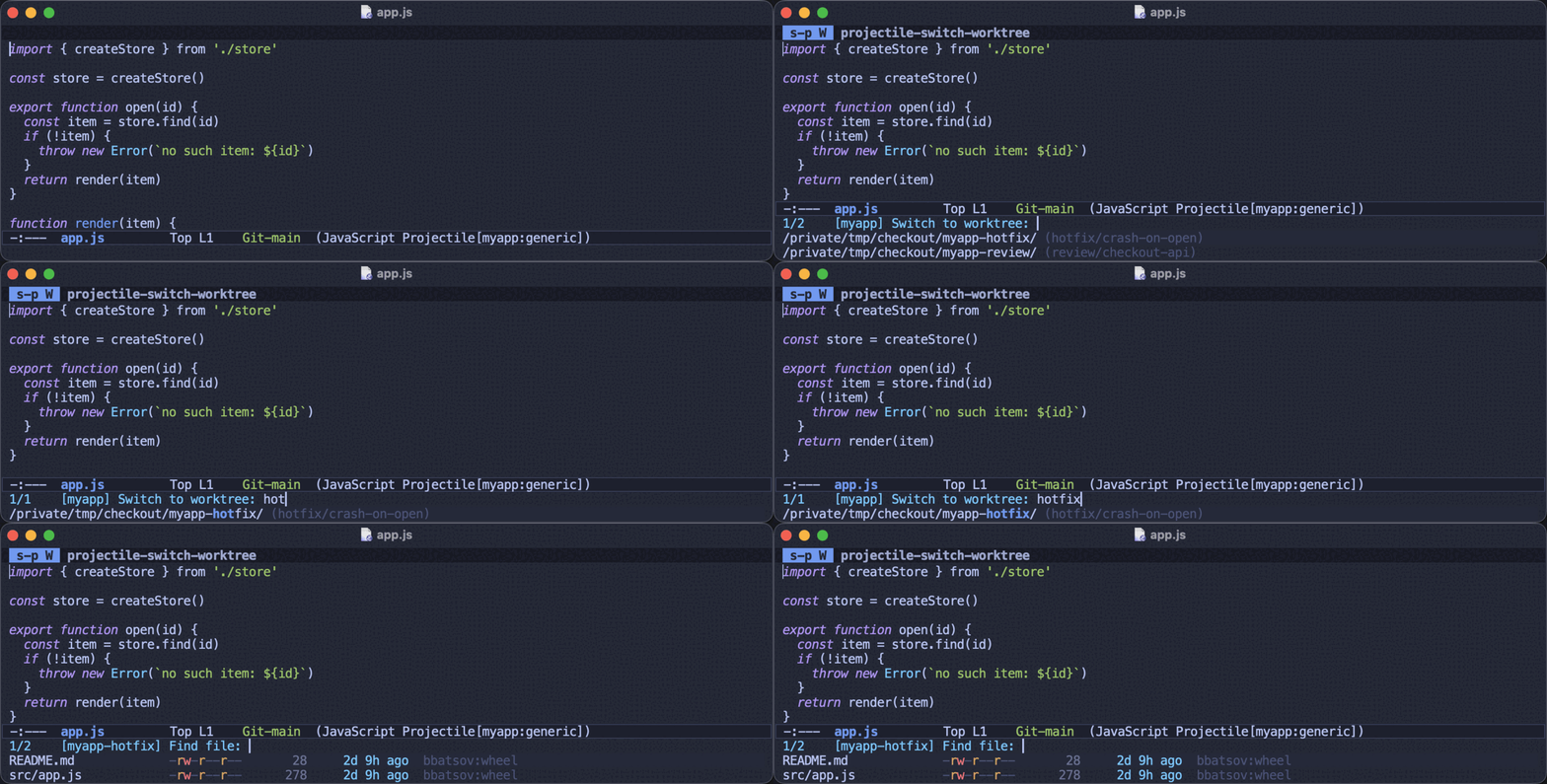
Several quite different mechanisms end up on that list, because from where you’re sitting they’re the same thing.
Git worktrees are the built-in mechanism:
git worktree add ../myapp-hotfix -b hotfix/crash-on-openProjectile asks git for these, so a worktree you have never opened in Emacs still shows up.
Jujutsu workspaces are the same idea under jj:
jj workspace add ../myapp-hotfixThese are enumerated too, so an unvisited one shows up as well, labelled
with its workspace name. A colocated repository (jj git init --colocate,
and in recent versions plain jj git init too) has both git worktrees and
Jujutsu workspaces, and both are offered.
Separate clones of the same upstream are the hand-rolled version of the same workflow, and plenty of people work that way:
git clone git@github.com:me/myapp.git myapp
git clone git@github.com:me/myapp.git myapp-experiment
Projectile can’t enumerate these from the repository - nothing records them anywhere - so it finds them among the known projects. A clone you have never visited won’t be offered until Projectile knows about it.
If your clones aren’t turning up, it’s almost always because they
aren’t known projects yet. Add ~/src to projectile-project-search-path
and run M-x projectile-discover-projects-in-search-path.
|
Where checkouts come from is controlled by projectile-worktree-functions,
a list of functions each taking a project root and returning what it
found. The default set covers git, Jujutsu and the known projects. To add
another way of tracking checkouts, write a function returning a list of
plists with :path (mandatory), :label and :prunable - see that
option’s docstring for the details.
Related projects
s-p n p offers the projects related to the one you’re in. Three
signals decide what "related" means, consulted in the order listed by
projectile-sibling-project-functions - from the one you can trust
completely to the one that’s a guess.
Groups you configure
The only signal that is never wrong, so it comes first:
(setq projectile-project-groups
      '(("myapp"  . ("~/src/myapp" "~/src/myapp-docs" "~/src/myapp-cli"))
        ("infra"  . ("~/src/deploy" "~/src/terraform"))))
A project can be in several groups; you get the members of all of them. Configured groups are never subject to the share cap - however many projects you put in a group, you meant to.
To describe one project’s siblings from the project itself, put
projectile-project-siblings in its .dir-locals.el instead:
;;; ~/src/myapp/.dir-locals.el
((nil . ((projectile-project-siblings . ("~/src/myapp-docs")))))
The owner of the upstream remote
This is by far the best of the guessed signals, and the only one that can
relate projects whose names have nothing in common. Projectile takes the
account or organization out of the remote URL, so everything under
github.com/clojure-emacs is related to everything else under it:
cider, orchard, haystack, sayid and port are one family, which
no amount of comparing directory names would ever discover.
It works on the normalized remote, so the spelling doesn’t matter:
git@github.com:me/app.git, https://github.com/me/app and
ssh://git@github.com:22/me/app/ are all the same repository.
The leading word of the directory name
The signal of last resort, and the only one that works with no version
control at all - a plain directory with a .projectile in it still gets
siblings. rubocop, rubocop-ast and rubocop-rails are related
because they start with the same word.
Only the leading word counts. Matching on any shared word relates every
-mode package to every other one and every docs. site to the rest,
which reads far more into a name than is actually there. The cost of that
choice is that helm-projectile is not offered as a sibling of
projectile - put them in a group if you want that.
When a group is too big
Inference that relates most of your projects to each other has found
nothing. If every repository you own is under your own account, "same
account" doesn’t distinguish anything, and offering that group is
projectile-switch-project with extra steps.
So an inferred group covering more than
projectile-sibling-max-group-share (a quarter by default) of your known
projects is dropped, and the next signal gets its turn. The cap doesn’t
apply until you have at least ten known projects, because a share of a
handful measures nothing, and a group of two always survives.
The visible consequence: if most of your projects share one account, that
signal goes quiet and you fall back to name matching. When a project you
care about ends up with no siblings, that’s what projectile-project-groups
is for.
Signals of your own
The three above are only the default value of
projectile-sibling-project-functions, which is a plain list of functions.
Each is called with a project root and should return a list of project
directories related to it; the results are concatenated in the order the
list gives, and a project found by more than one function is offered once,
in the position the first one to report it put it.
So you can add a signal of your own - reading a workspace manifest, asking a service, consulting whatever your organization uses to say which repositories belong together:
(defun my-siblings-from-manifest (root)
  "Return the projects listed beside ROOT in our workspace manifest."
  ...)

;; ahead of the built-ins, so it wins where it has an opinion
(add-to-list 'projectile-sibling-project-functions #'my-siblings-from-manifest)
Put yours before the built-ins to have it take precedence, after them to act as a fallback, or replace the list outright to use nothing else.
| The share cap applies inside the two inferred signals, not to the list as a whole, so a function of your own is never capped - it behaves like a configured group. That’s usually what you want, but it does mean a function that accidentally matches everything will offer you everything. |
Working across a group
Switching isn’t the only thing you want a family of projects for. Two commands work on the whole group at once, the current project included:
-
s-p n f (
projectile-find-file-in-sibling-projects) completes over the files of every related project. It’s s-p F narrowed from "every project I have ever visited" to "the handful this one belongs with", which is the difference between a useful completion list and a hopeless one. -
s-p n s (
projectile-search-in-sibling-projects) searches them all and collects the matches in oneprojectile-searchbuffer. A prefix argument makes the term an Emacs regexp. -
s-p n t (
projectile-todos-in-sibling-projects) gathers the family’sTODO/FIXMEannotations into that same buffer. -
s-p n b (
projectile-switch-to-buffer-in-sibling-projects) completes over the buffers you have open in any of them, so you can jump between a library and its caller without caring which project a buffer belongs to. -
s-p n o (
projectile-multi-occur-in-sibling-projects) runsmulti-occurover those same buffers. Note this searches what you have open, not the projects on disk - s-p n s is the one that reads files.
The search results are named relative to the innermost directory holding the group, so each match says which project it came from:
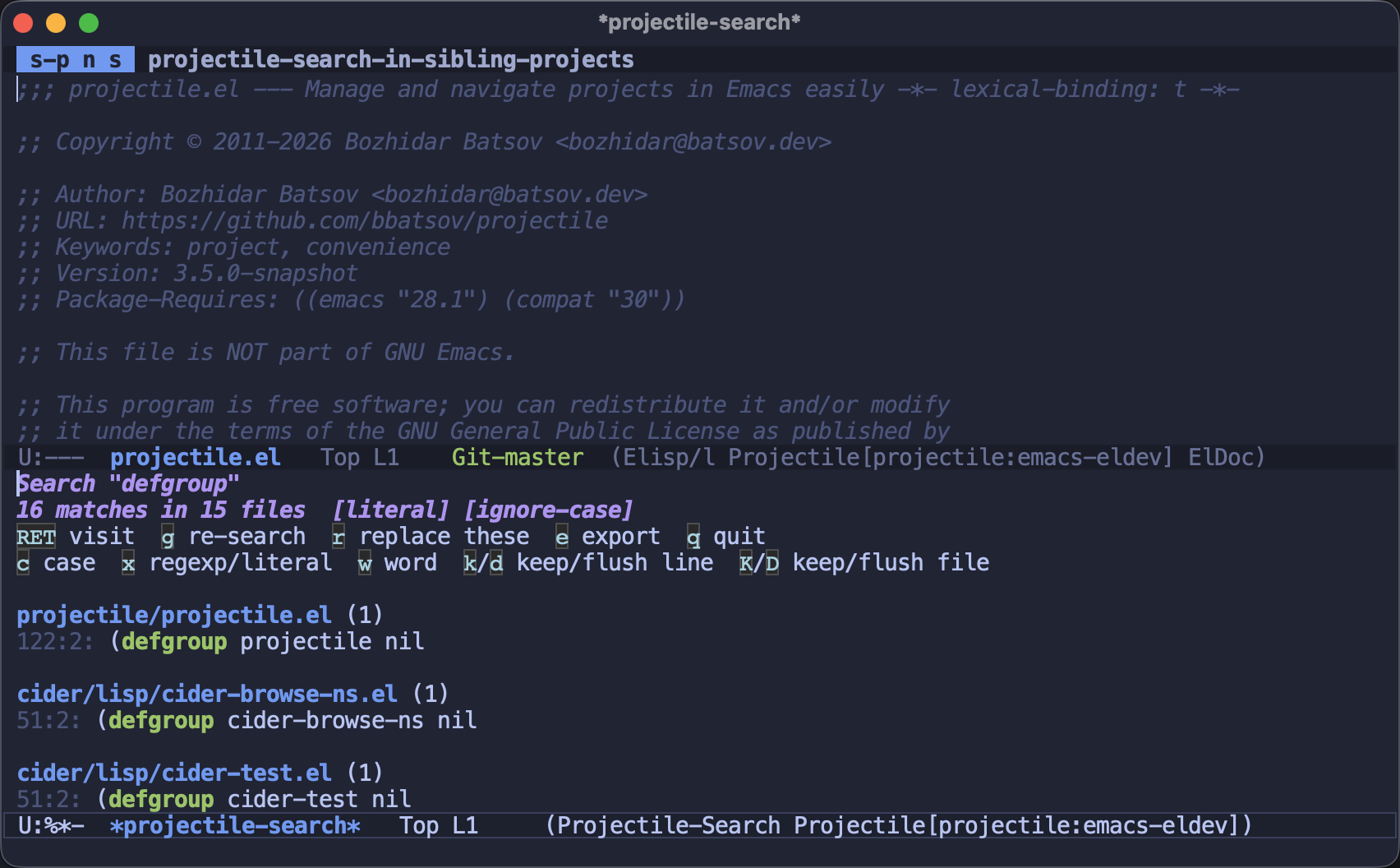
Everything the buffer does then covers the whole group - filtering,
re-search, exporting to grep-mode, and r to turn it into a
reviewable replacement across all of them. See
the search and replace reviewers.
These all take a plain list of projects underneath -
projectile-find-file-in-projects, projectile-search-in-projects,
projectile-switch-to-buffer-in-projects,
projectile-multi-occur-in-projects and projectile-todos-in-projects -
so a command for a group of your own is a two-line wrapper:
(defun my-find-file-in-infra-projects ()
  (interactive)
  (projectile-find-file-in-projects
   (cdr (assoc "infra" projectile-project-groups))
   "Find file in infra: "))
The others are the same shape: each takes the project list first, and the
sibling commands are nothing more than these with
projectile-sibling-projects filled in.
A literal group search runs rg over each project in turn when
ripgrep is installed - one per project rather than one over the lot,
because ignore globs are anchored to the project that wrote them. Each
project is therefore filtered by its own rules, wherever you happen to be
sitting. Without ripgrep the search falls back to the Emacs Lisp scanner,
which is noticeably slower on a large group.
|
What else checkouts share
Knowing that two roots are one repository is useful beyond switching between them: the command history you browse at a compile or test prompt is shared across checkouts, so a worktree made this morning already offers the commands the project is built with. See History across checkouts.
The line elsewhere is drawn at anything that acts without asking, which stays
local to the checkout you’re in: the command a prompt is pre-filled with, what
projectile-repeat-last-command replays, and the task
projectile-repeat-last-task re-runs. A remembered command can carry absolute
paths back into the checkout it was typed in, and being handed somebody else’s
build unasked is no fun.
Per-project sessions aren’t shared either, for a different reason: a window layout is a set of files in a particular directory, and the whole point of a second checkout is that its files differ.
How Projectile decides two projects are the same repository
Both commands rest on projectile-repo-identity, which describes what
repository a project root is a checkout of:
:repo-
The directory the checkouts share - git’s common dir, the store an
hg sharepoints at, the git directory a Jujutsu repository keeps its commits in. Two roots with the same:repoare worktrees of each other. :remote-
A canonical spelling of the upstream, so the scp-like and URL forms of one remote compare equal. Two roots with the same
:remoteare separate clones. :owner-
The account, organization or containing directory that upstream hangs off. This is what the sibling owner signal groups on.
It reads the version control system’s own files rather than running it, so comparing every known project costs file reads instead of a process launch apiece.
Limitations
Worth knowing before you file a bug:
-
The guessed signals are guesses. The share cap will sometimes leave a project with no siblings at all - that’s the design working, not a failure. Configure a group for that project.
-
Name matching only looks at the first word.
helm-projectilewill not be offered as a sibling ofprojectile. -
Identity comes from the remote, not the directory name. A directory called
emacs-fsharp-tswhose remote isme/fsharp-ts-modeis related to whatever else lives underme, and is not related to other directories starting withemacs. -
A repository with no remote gets name matching only - there’s no owner to group on.
-
Only a repository’s own top level has an identity. A project defined by a
.projectilefile inside a larger repository is a directory in a checkout, not a checkout of its own, so it has no worktrees - the enclosing repository’s worktrees are not other copies of it, and aren’t offered as though they were. Projectile cannot yet map such a project to the matching subdirectory of another worktree. -
Remote (TRAMP) projects are skipped. Every probe would be a network round trip, so a remote project has no identity and no worktrees.
-
Sibling clones must already be known projects. Real git worktrees and Jujutsu workspaces are found without that, since the version control system registers them itself.
-
Only git and Jujutsu checkouts carry a label. A Mercurial share is offered without one, since Projectile would have to run
hgto learn its branch and the whole point of the lookup is that it doesn’t.
When s-p W has nothing to offer it distinguishes the two reasons: having looked and found no other checkout, and not being able to look at all because the project isn’t the top level of a git, Mercurial or Jujutsu repository. Only the first means "there aren’t any". s-p n p needs none of this, so it’s the one to reach for when Projectile can’t identify the repository.
Version control support
| System | What works |
|---|---|
Git |
Everything. Worktrees come from |
Mercurial |
A working directory created by |
Jujutsu |
Workspaces come from |
Everything else |
No worktree support. Fossil check-outs, Subversion, Bazaar, Darcs and Sapling are all treated as ordinary projects. |